Cox Webmail Account Login: Sign In and Email Settings
Cox email sign in is your starting point in the world of high speed internet that provides by Cox internet service, high quality of TV, connection powered by digital telephone, online billing and account management.
This article would help you to deal with Cox email login, easily describe how to login and sign in your account and perform cox.net email settings. Furthermore you may read not only about Cox webmail sign in, but also you will receive all the necessary information about your private and Cox business email accounts.
Cox Webmail Login: Open My Cox Email Account
If you are a newcomer in Cox webmail and want to sign in account, firstly, you need to create an account. In order to do this you need to perform several steps:
- Choose the official suite of Cox.com the title "Sign in My Account" then click at "No Account? Register Now!" (that located at the top of the screen);
Now registration can be made through the 2 methods: with the help of your card or your address:

Images from www.cox.com
- Then enter the following personal data.
The first Method: Account Number: |
The second Method: |
- Press "Continue" in order to complete the registration.

Cox.net Sign In: How Enter to Account
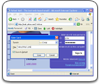
When the Sign In screen appears in the window of Cox webmail my account, perform the following steps:
- On the official Cox.com website enter your full address in the User ID (If your email address is example@cox.com, then you should enter your User ID: example@cox.com).
- Enter your password.
- Press "Sign in".
- You may put a check mark in the appropriate box to store ID.
Also it is possible to save automatically the Login to Cox email using a handy password manager.
Cox Email Sign In: Get Access to My Cox Account
In case you cannot get access to your account in Cox email sign in system, because you forgot your Password, in the section of "Sign in My Account" click at "Forgot Password" and do the following:
- Enter your E-mail Address;
- Then click at "Reset Password";
Cox communications customer service: do you need a help with your account?
If you still have any questions or difficulties with Cox webmail account or want to clarify Cox email login server settings you may get a contact with Customer Service system. In order to do this, you may follow different ways of communication.
You may do it by contact the Technical Support system of Cox webmail my account by phone, listed on the official website (866-272-5777). Another way is to get a contact with Cox email sign in by email: click at "email us" in the section of "contacts" then choose which service you need and write a question that bothering you in the special form (declare your Phone Number, Company, Zip Code, First and Last Name, Street Address and Email).
We wish you a pleasant use of Cox webmail account!
See also:
Comcast mail
Mysql login,
Aol mail screenshot
Bloglines login
 |  |  |