Email server settings
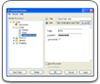
To be able to use the Database on the Email Server functionality, you need to specify the email server settings when you create a database in your mailbox. Specifically, you need to know the settings of your incoming (POP3) and outgoing server (SMTP). With most free POP3 mail services, you will find the server settings on your email server’s web site in the Email Help or POP3/SMTP FAQs.
However, if you are using an Internet connection through a proxy server, you should contact your network administrator or the Internet provider.
 |  |  |